Workflows
An agent is an LLM loop. A workflow is a deterministic DAG of steps that runs the same way every time. Reach for one when you know the sequence up front (fetch → validate → transform → publish) and you want each step to be observable and resumable, with no model guesswork.
A workflow is just an agent with a definition, so you author, push, and run it
with the same commands you already use for agents.
Create one
A workflow is a JSON file with agent_type: "workflow_agent" and a definition
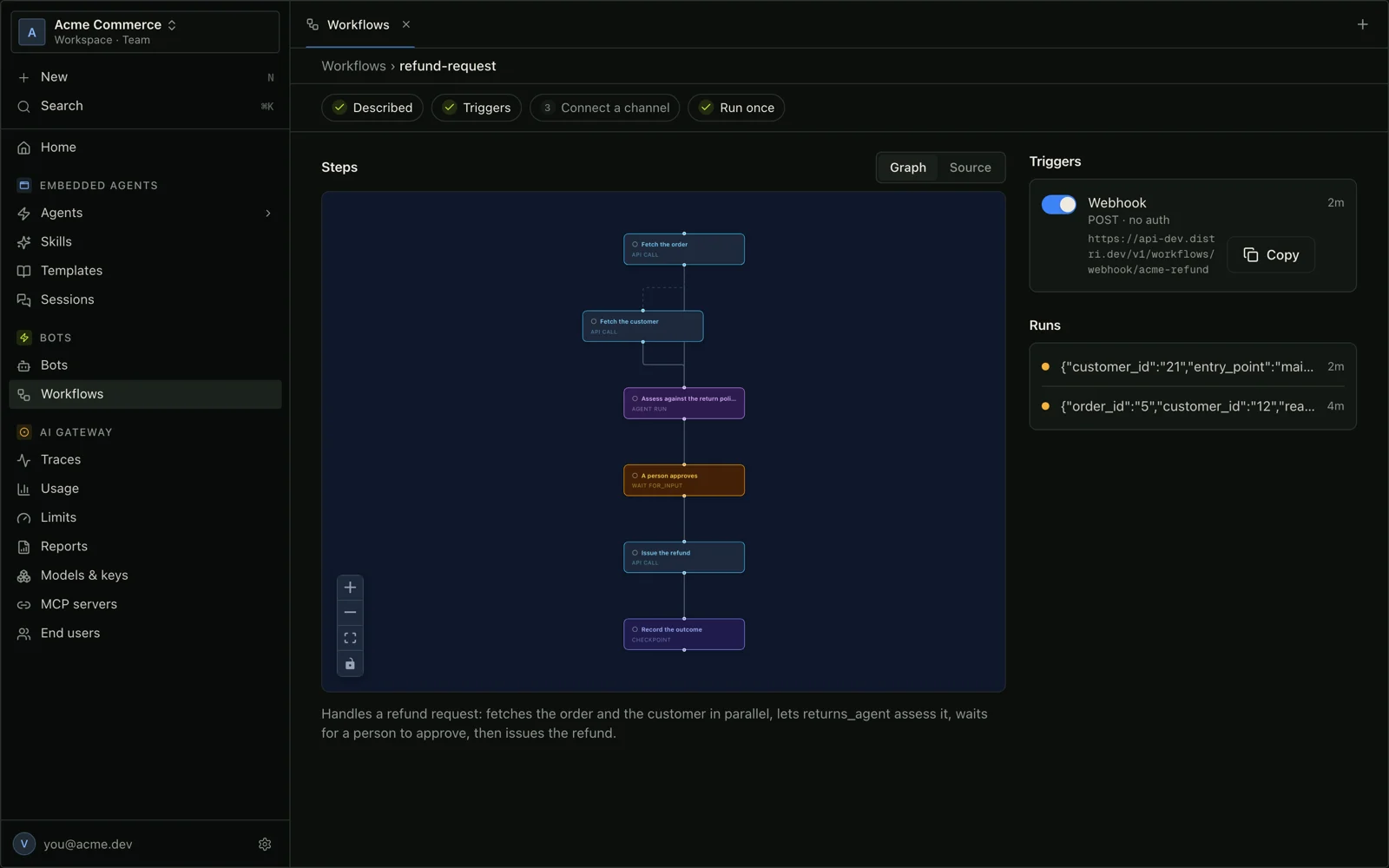
holding the steps. This is the full refund workflow from the screenshots below: it
fetches the order and the customer in parallel, lets returns_agent assess the
request, waits for a person to approve, then issues the refund.
{
  "agent_type": "workflow_agent",
  "name": "refund-request",
  "description": "Handles a refund request: fetches the order and the customer in parallel, lets returns_agent assess it, waits for a person to approve, then issues the refund.",
  "version": "0.1.0",
  "definition": {
    "id": "refund-request",
    "input_schema": {
      "type": "object",
      "required": ["order_id", "customer_id", "reason"],
      "properties": {
        "order_id": { "type": "string" },
        "customer_id": { "type": "string" },
        "reason": { "type": "string" }
      }
    },
    "steps": [
      {
        "id": "fetch_order",
        "label": "Fetch the order",
        "execution": "parallel",
        "kind": { "type": "api_call", "method": "GET", "url": "https://dummyjson.com/carts/{input.order_id}?select=total,totalProducts" }
      },
      {
        "id": "fetch_customer",
        "label": "Fetch the customer",
        "execution": "parallel",
        "kind": { "type": "api_call", "method": "GET", "url": "https://dummyjson.com/users/{input.customer_id}?select=firstName,email" }
      },
      {
        "id": "assess",
        "label": "Assess against the return policy",
        "depends_on": ["fetch_order", "fetch_customer"],
        "kind": {
          "type": "agent_run",
          "agent_id": "returns_agent",
          "prompt": "Refund request for order {input.order_id}. Reason: {input.reason}. Order total: {steps.fetch_order.body.total}. Customer: {steps.fetch_customer.body.firstName}."
        }
      },
      {
        "id": "approve",
        "label": "A person approves",
        "depends_on": ["assess"],
        "kind": { "type": "wait_for_input", "message": "Approve the refund for order {input.order_id}?" }
      },
      {
        "id": "refund",
        "label": "Issue the refund",
        "depends_on": ["approve"],
        "kind": {
          "type": "api_call",
          "method": "POST",
          "url": "https://httpbin.org/post",
          "body": { "order_id": "{input.order_id}", "action": "refund" }
        }
      },
      {
        "id": "done",
        "label": "Record the outcome",
        "depends_on": ["refund"],
        "kind": { "type": "checkpoint", "message": "Refund issued for order {input.order_id}." }
      }
    ],
    "entry_points": [
      {
        "id": "main",
        "label": "Refund request",
        "description": "Started by the storefront's webhook, or by hand",
        "starts_at": "fetch_order",
        "preset_results": {},
        "required_inputs": ["order_id", "customer_id", "reason"],
        "triggers": [
          { "type": "webhook", "path": "acme-refund", "methods": ["POST"], "auth": { "type": "none" }, "response": { "type": "ack" } },
          { "type": "manual" }
        ]
      }
    ]
  }
}
Push it to your workspace, then run it:
distri agents push workflows/refund_request.json
distri run --agent refund-request \
  --task '{"order_id":"5","customer_id":"12","reason":"Lamp arrived broken"}'
A smaller example: two tool_call steps run in parallel, then a checkpoint.
tool_call requires input, even when it is empty.
{
  "agent_type": "workflow_agent",
  "name": "api-test",
  "description": "List agents and skills, then summarize",
  "version": "0.1.0",
  "definition": {
    "id": "api-test",
    "steps": [
      { "id": "list_agents", "label": "List agents",
        "kind": { "type": "tool_call", "tool_name": "list_agents", "input": {} }, "execution": "parallel" },
      { "id": "list_skills", "label": "List skills",
        "kind": { "type": "tool_call", "tool_name": "list_skills", "input": {} }, "execution": "parallel" },
      { "id": "summarize", "label": "Summarize",
        "kind": { "type": "checkpoint", "message": "Scan complete." },
        "depends_on": ["list_agents", "list_skills"] }
    ]
  }
}
Each step declares what it does (kind) and what it waits on (depends_on).
Steps with no unmet dependency run together; execution: "parallel" opts a step
into concurrent execution with its siblings.
Step kinds
| Kind | Runs |
|---|---|
tool_call | A single tool, once (not a full agent loop). |
agent_run | Delegates to a Distri agent (prompt, tools, skills, model). |
api_call | An HTTP request. |
script | A shell/script step with its own cwd, env, and timeout. |
condition | Branches on an expression. |
checkpoint | A marker / progress point in the run. |
wait_for_input | Pauses for human or external input, then resumes. |
reply | Emits a message (with optional buttons) to a channel. |
Templates
Step fields interpolate three sources, so a later step can use an earlier step's output:
{input.x}: a field of the run's input, e.g.{input.order_id}.{steps.<id>.x}: a field of an earlier step's result, e.g.{steps.fetch_order.body.total}.{env.X}: an environment value, such as a token from a connection the workflow uses.
Human-in-the-loop
A wait_for_input step pauses the run until a person (or an external system)
supplies the missing value, then continues from where it stopped. Entry
points let you start a run partway through, e.g. a review_and_publish entry
that presets earlier results and begins at the review step.
Triggers
Triggers say what starts a run. They live on an entry point
(definition.entry_points[].triggers, as in the refund example) or at the top
level of the file (triggers, applied to the default entry point). With no
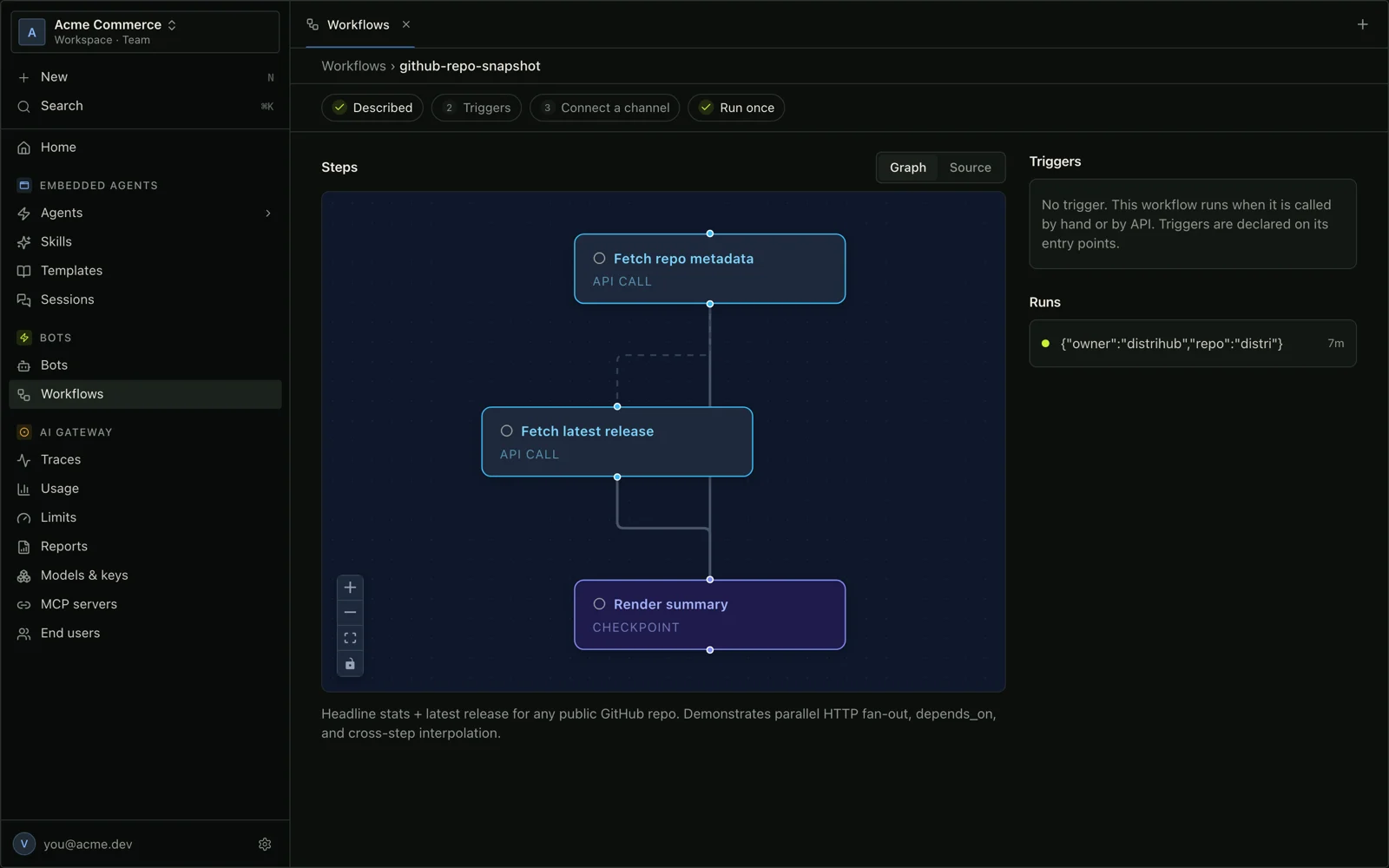
triggers, a workflow is manual: it runs when called by hand or through the API.
type | Fields | Starts a run when |
|---|---|---|
manual | none | Called by hand, with distri run, or through the API. The default. |
schedule | cron, timezone, enabled, input | The cron expression fires. Six fields, seconds first: "0 0 9 * * *" is 09:00:00 every day. timezone is an IANA name (default UTC). input is passed to each run. |
webhook | path, methods, auth, response | An HTTP request reaches POST https://api.distri.dev/v1/workflows/webhook/<path>. |
slash | name, aliases, channels, args | Someone sends the slash command on a connected channel. |
callback | id, arg | Someone taps a button whose callback data is wf:<id> or wf:<id>:<value>. |
message | none | Someone sends free text (not a command) on a connected channel. |
event | topic, filter | An event with that topic, matching the filter, is published. |
tool | name, description, input_schema | Another agent calls the workflow as a tool. Its final result is the tool result. |
Webhook
{
  "type": "webhook",
  "path": "acme-refund",
  "methods": ["POST"],
  "auth": { "type": "none" },
  "response": { "type": "ack" }
}
auth:none,hmac_header(headerplus aconnection_idholding the secret, e.g.X-Hub-Signature-256), orbearer_token(connection_id).response:ackanswers 202 at once and runs in the background.syncwaits for the workflow's reply, up totimeout_secs.
curl -X POST https://api.distri.dev/v1/workflows/webhook/acme-refund \
  -H "Content-Type: application/json" \
  -d '{"order_id":"7","customer_id":"21","reason":"Rug colour differs from the photo"}'
With ack, the answer is 202 with the task_id and thread_id of the new run.
Schedule
{
  "type": "schedule",
  "cron": "0 0 9 * * *",
  "timezone": "Europe/London",
  "enabled": true,
  "input": { "owner": "distrihub", "repo": "distri" }
}
In the dashboard
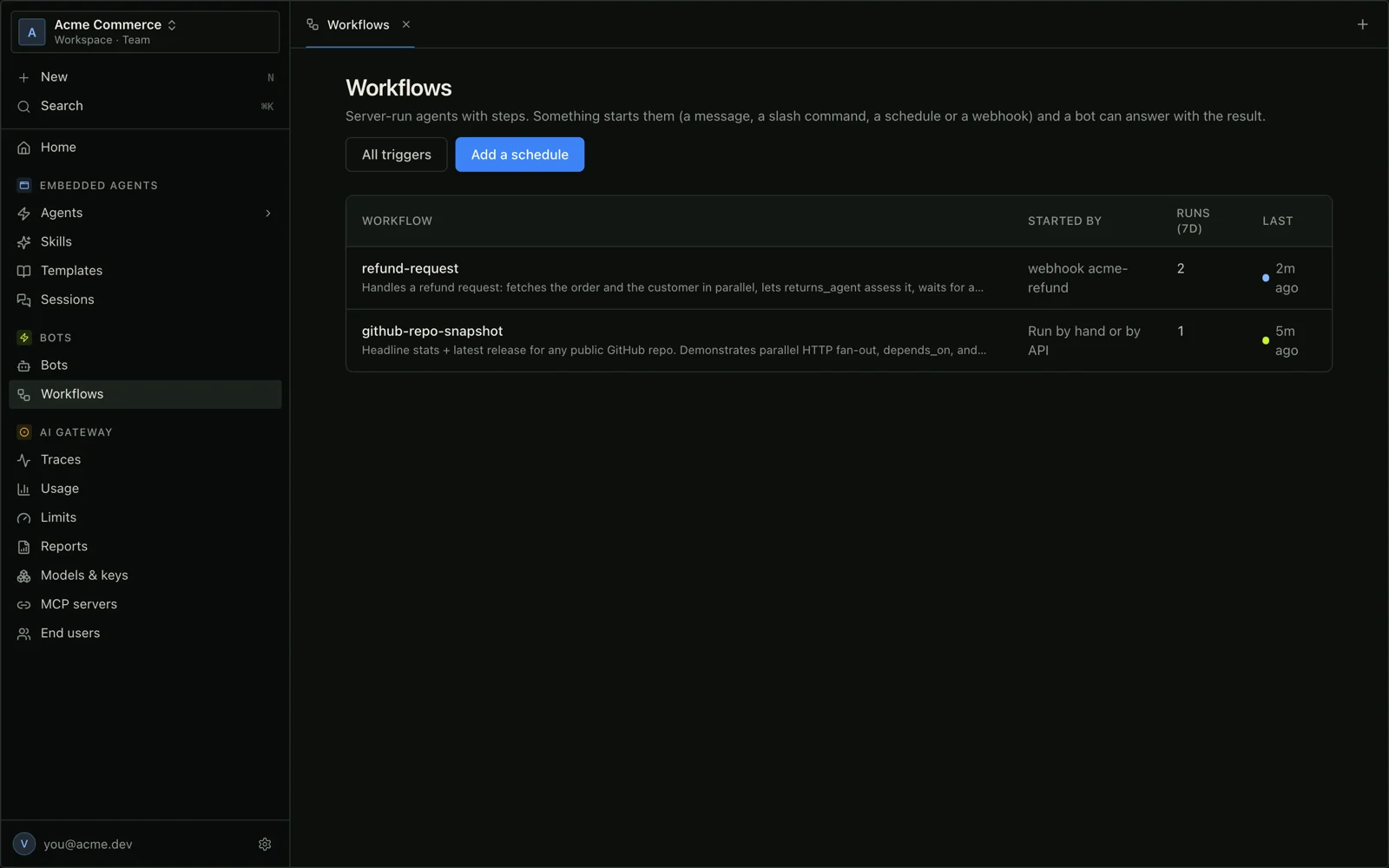
Bots → Workflows lists every workflow with what starts it, its runs in the last 7 days and its last run.
Open a workflow to see its steps as a graph (or its source), its triggers and its runs. The webhook trigger shows the URL to copy.
A workflow with no trigger runs by hand or by API:
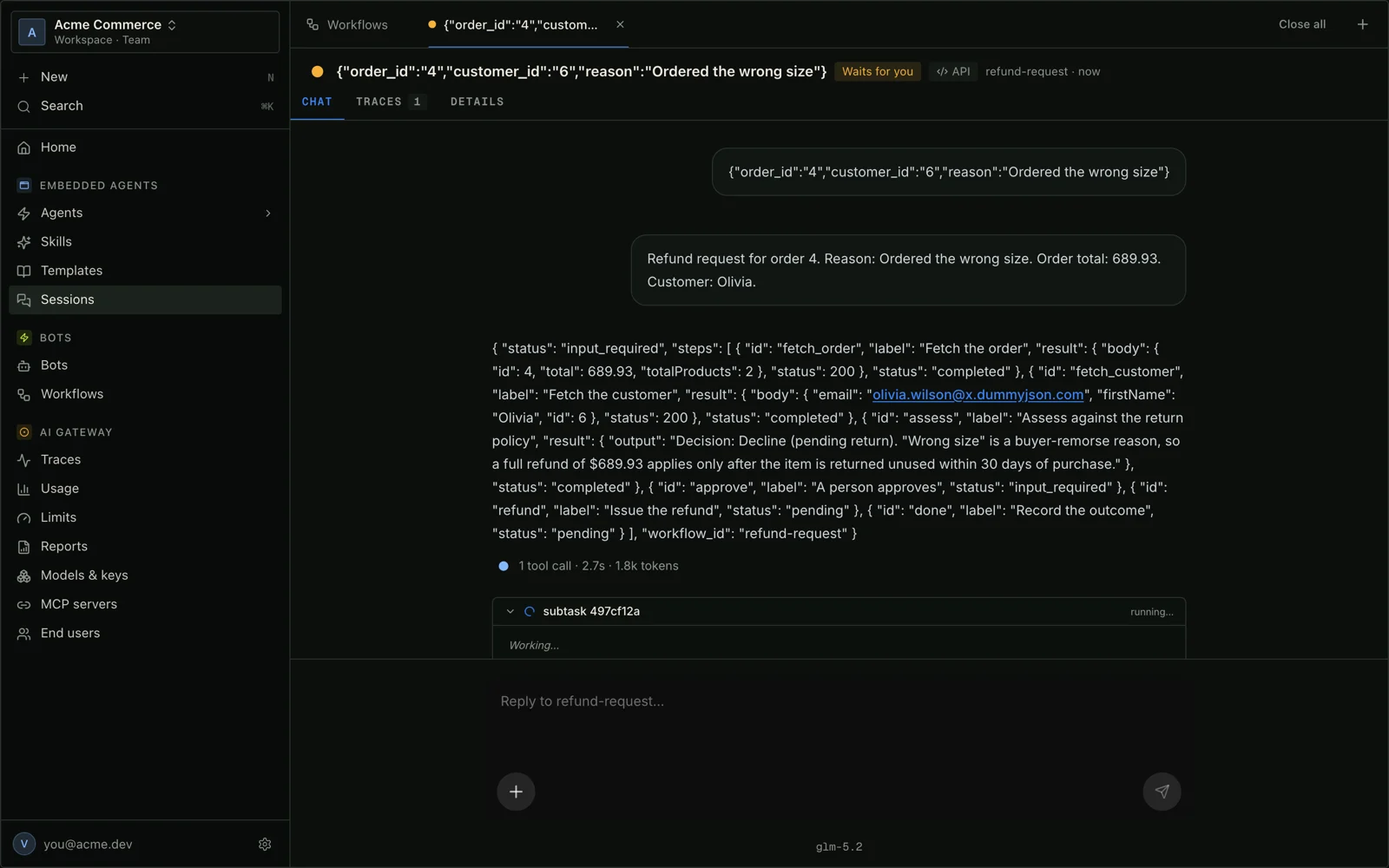
Open a run to see each step's output. This run is paused at the approval step,
after returns_agent decided on a partial refund. Reply to continue it.
Push and run
Workflows ship through the normal agent commands. There is no separate
distri workflows command:
distri agents push workflows/refund_request.json   # deploy it to your workspace
distri run --agent refund-request --task '{"order_id":"5","customer_id":"12","reason":"Lamp arrived broken"}'
distri push (no arguments) picks up workflow JSON alongside your agents,
skills, and templates. The older distri workflows push/run commands no longer
exist.
In the client
useWorkflow and the WorkflowProgress component render step progress and
surface wait_for_input prompts. See
Using Distri in your product.
Related
- Agent Definition · Sub-Tasks · Channels (for
replysteps).