An AI customer service agent that answers from your docs and files the ticket
A chat on your site, set up to answer from your docs pages and, when they don’t cover a question, to take an email and file a Linear issue through a server-side workflow.
- Website embed
- Linear
- Telegram
- blueprint: website-support
“Create an onboarding agent for my product on example.com that answers questions from our docs and opens a support ticket when it can’t help.”
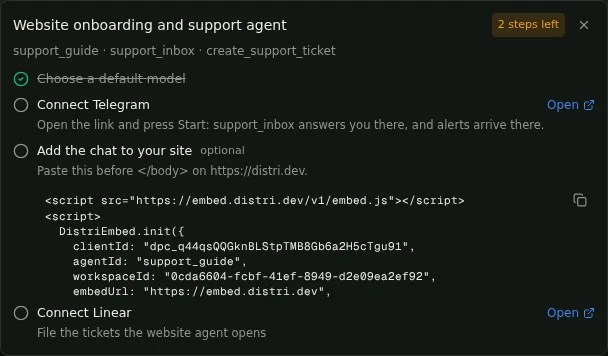
The run, step by step
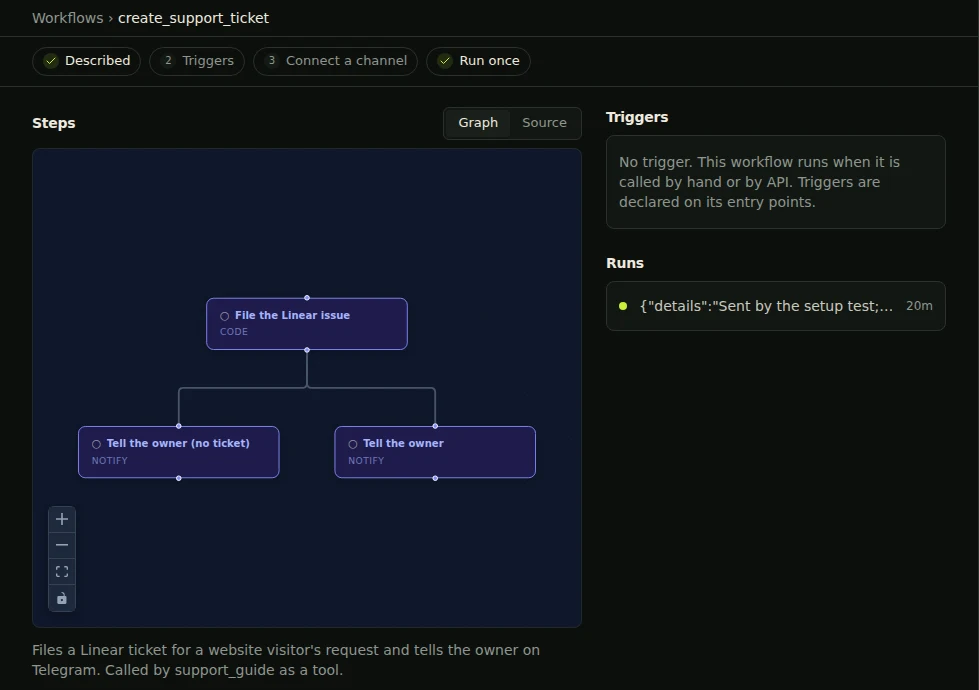
What the sentence sets up
| What | Name | What it does |
|---|---|---|
| Agent | support_guide | Web agent embedded on your site. Reads the docs pages before it answers and links the page it used. Never invents features, prices or limits. |
| Workflow | create_support_ticket | Called as a tool by support_guide. Runs on the server: files the Linear issue in a TypeScript code step and tells you on Telegram. |
| Agent | support_inbox | The Telegram chat where ticket notices arrive. |
| Embed | public client | Allowed origin site_url. Apply prints the script tag to paste before </body>. |
| Connection | Linear | Required. Scope issues:create. |
visitor ─► support_guide (in your page) ─┬─ docs answer it ─► answer + link to the page
                                         └─ they don't ─► ask for email ─► create_support_ticket (server)
                                                                            ├─ Linear issue (code step)
                                                                            └─ 🎫 notice on Telegram
Apply it with one request
The web chat and distri apply both call POST /v1/blueprints/apply. This request and its response are from a run on Distri’s staging server on 20 Nov 2026; the response is trimmed.
curl -s -X POST "$DISTRI_API/blueprints/apply" \
  -H "Authorization: Bearer $TOKEN" -H "X-Workspace-Id: $WORKSPACE" \
  -H 'Content-Type: application/json' \
  -d '{"sample": "website-support", "params": {"product_name": "distri",
       "site_url": "https://distri.dev", "docs_url": "https://distri.dev/docs/",
       "linear_team_key": "SUP"}}'
{
  "blueprint": "website-support",
  "status": "pending",
  "items": [
    { "kind": "agent", "name": "support_guide", "action": "created" },
    { "kind": "agent", "name": "support_inbox", "action": "created" },
    { "kind": "workflow", "name": "create_support_ticket", "action": "created" },
    { "kind": "public_client", "name": "dpc_…", "action": "ready" }
  ],
  "pending": [
    { "title": "Choose a default model", "done": true },
    { "title": "Connect Telegram", "done": false },
    { "title": "Add the chat to your site", "done": false },
    { "title": "Connect Linear", "done": false }
  ],
  "message": "Set up. 2 steps need you: Connect Telegram, Connect Linear."
}
The same with the CLI
distri apply samples/website-support \
  --set product_name=Acme --set site_url=https://acme.com \
  --set docs_url=https://acme.com/docs --set linear_team_key=SUP --wait --test
Parameters
| Param | Default | Meaning |
|---|---|---|
product_name | required | The product the agent talks about. |
site_url | required | The origin the chat is embedded on; the only allowed origin of the embed client. |
docs_url | required | Where the agent starts reading the docs. |
linear_team_key | required | The Linear team tickets go to, e.g. SUP. |
The visitor never sees a credential
The website agent has two tools: browsr_scrape to read the docs, and the workflow create_support_ticket. It cannot call Linear itself. The workflow runs on the Distri server, reads the token from the workspace's Linear connection through the step's input mapping, and passes it to tools/create_ticket.ts, which may only reach api.linear.app (declared in its front matter). The blueprint's test case checks that the browser never receives a Linear token.
When the agent hands over
support_guide files a ticket when the docs don't answer the question, when the visitor reports a bug or a billing problem, or when they ask for a person. It asks for an email first and never files a ticket without one. The ticket carries the email, a one-line summary, what the visitor tried and the page they were on.
The blueprint
Plain files in samples/website-support. Copy the folder, change the prompt or the schedule, and apply it again.
blueprint.toml
name = "website-support"
title = "Website onboarding and support agent"
category = "support"
about = "An agent on your website that answers questions from your docs and, when it can't help, files a support ticket in Linear and tells you on Telegram."
prompt = "Create an onboarding agent for my product on example.com that answers questions from our docs and opens a support ticket when it can't help."

[params.product_name]
ask = "What is the product called?"
example = "Acme"

[params.site_url]
ask = "Which website will it be embedded on (the origin, like https://acme.com)?"
example = "https://acme.com"

[params.docs_url]
ask = "Where are the docs it should answer from?"
example = "https://acme.com/docs"

[params.linear_team_key]
ask = "Which Linear team should tickets go to (its key, like SUP)?"
example = "SUP"

[embed]
agent = "support_guide"
origins = ["{{params.site_url}}"]

[channel]
kind = "telegram"
agent = "support_inbox"
workflows = ["create_support_ticket"]

[[connections]]
provider = "linear"
scopes = ["issues:create"]
required = true
why = "File the tickets the website agent opens"

[test]
workflow = "create_support_ticket"
input = { email = "[email protected]", summary = "Test ticket from distri setup", details = "Sent by the setup test; you can close it.", page = "{{params.site_url}}", test = true }
expect = "A ticket appears in Linear and a 🎫 message arrives on Telegram"
agents/support_guide.md
---
name = "support_guide"
description = "{{params.product_name}}'s onboarding and support guide on {{params.site_url}}: answers from the docs, opens a ticket when it can't help"
max_iterations = 12
tool_format = "provider"
runtime = "web"

[tools]
builtin = ["final", "browsr_scrape"]
workflows = ["create_support_ticket"]
---

# ROLE
You are the onboarding and support guide for **{{params.product_name}}**, chatting with visitors on {{params.site_url}}. The documentation is at {{params.docs_url}}.

# HOW TO ANSWER
- Answer from the docs. Read the relevant page with `browsr_scrape` (start at {{params.docs_url}} and follow links) before you answer anything specific. Quote steps exactly and link the page you used.
- For a new user, give the shortest path to their first success: what to click, in order, in at most five steps.
- Never invent features, prices, limits or dates. If the docs don't say, you don't know.

# WHEN YOU CAN'T HELP
If the docs don't answer the question, the visitor reports a bug or billing problem, or they ask for a person:
1. Say you'll pass it to the team, and ask for their email if you don't have it. Never file a ticket without an email.
2. Call `create_support_ticket` with `email`, `summary` (one line), `details` (what they tried, what happened, and anything you found in the docs) and `page` (where they are, if known).
3. Tell them the ticket was filed and the team will reply by email. Give the ticket id if the result has one.

# STYLE
Friendly, short and concrete. No headings. Use lists only for steps.
agents/support_inbox.md
---
name = "support_inbox"
description = "Tells the owner about new {{params.product_name}} support tickets on Telegram and answers questions about them"
max_iterations = 8
tool_format = "provider"
runtime = "server"

[tools]
builtin = ["final", "notify"]
---

# ROLE
You are the support inbox for **{{params.product_name}}**. New tickets from the website agent arrive in this chat. When the owner asks about them, answer from the conversation so far. Be brief.
workflows/create_support_ticket.json
{
  "agent_type": "workflow_agent",
  "name": "create_support_ticket",
  "description": "Files a Linear ticket for a website visitor's request and tells the owner on Telegram. Called by support_guide as a tool.",
  "version": "0.1.0",
  "connections": [
    { "provider": "linear", "env_var": "LINEAR_TOKEN", "required": false }
  ],
  "definition": {
    "id": "create_support_ticket",
    "steps": [
      {
        "id": "ticket",
        "label": "File the Linear issue",
        "on_failure": "continue",
        "input": {
          "token": "{env.LINEAR_TOKEN}",
          "team_key": "{{params.linear_team_key}}",
          "email": "{input.email}",
          "summary": "{input.summary}",
          "details": "{input.details}",
          "page": "{input.page}"
        },
        "kind": { "type": "code", "module": "tools/create_ticket.ts" }
      },
      {
        "id": "tell_owner",
        "label": "Tell the owner",
        "depends_on": ["ticket"],
        "when": "{steps.ticket.ok}",
        "kind": {
          "type": "notify",
          "to": "owner",
          "text": "🎫 {steps.ticket.identifier} from {input.email}: {input.summary}\n{steps.ticket.url}"
        }
      },
      {
        "id": "tell_owner_failed",
        "label": "Tell the owner (no ticket)",
        "depends_on": ["ticket"],
        "when": "!{steps.ticket.ok}",
        "kind": {
          "type": "notify",
          "to": "owner",
          "text": "📨 Support request from {input.email}: {input.summary}\n\n{input.details}\n\n(The Linear ticket could not be created: {steps.ticket.error})"
        }
      }
    ],
    "entry_points": [
      {
        "id": "main",
        "label": "New support request",
        "starts_at": "ticket",
        "triggers": [
          {
            "type": "tool",
            "name": "create_support_ticket",
            "description": "File a support ticket for a website visitor",
            "input_schema": {
              "type": "object",
              "required": ["email", "summary"],
              "properties": {
                "email": { "type": "string" },
                "summary": { "type": "string" },
                "details": { "type": "string" },
                "page": { "type": "string" }
              }
            }
          }
        ]
      }
    ]
  }
}
tools/create_ticket.ts
// ---
// [permissions]
// net = ["api.linear.app"]
// [tool]
// timeout = 30
// ---
// File a Linear issue for a support request. The token comes from the workflow's Linear
// connection through the step's input mapping; it never reaches the website.
import { defineTool, s } from "jsr:@distri/tool";

async function linear(token: string, query: string, variables: Record<string, unknown>) {
  const res = await fetch("https://api.linear.app/graphql", {
    method: "POST",
    headers: { "content-type": "application/json", authorization: token.startsWith("lin_") ? token : `Bearer ${token}` },
    body: JSON.stringify({ query, variables }),
  });
  const body = await res.json();
  if (!res.ok || body.errors) throw new Error(`linear: ${res.status} ${JSON.stringify(body.errors ?? body)}`);
  return body.data;
}

export const tool = defineTool({
  name: "create_ticket",
  description: "Create a Linear issue for a support request",
  input: s.object({
    token: s.string(),
    team_key: s.string(),
    email: s.string(),
    summary: s.string(),
    details: s.optional(s.string()),
    page: s.optional(s.string()),
  }),
  async run({ token, team_key, email, summary, details, page }) {
    if (!token || token.startsWith("{env.")) throw new Error("Linear is not connected");
    const teams = await linear(token, "query($key: String!) { teams(filter: { key: { eq: $key } }) { nodes { id } } }", { key: team_key });
    const teamId = teams.teams.nodes[0]?.id;
    if (!teamId) throw new Error(`no Linear team with key ${team_key}`);
    const description = [`**From:** ${email}`, page ? `**Page:** ${page}` : "", "", details ?? ""].join("\n");
    const out = await linear(
      token,
      "mutation($input: IssueCreateInput!) { issueCreate(input: $input) { success issue { identifier url } } }",
      { input: { teamId, title: summary, description } },
    );
    const issue = out.issueCreate.issue;
    return { ok: true, identifier: issue.identifier, url: issue.url };
  },
});
Put it in your product
Every agent Distri runs can also be embedded in your own app with @distri/react or a script tag, and call your product’s functions in the signed-in user’s session. The AI gateway records each model call against the end user, so you see the cost per customer and can cap it.
More agents
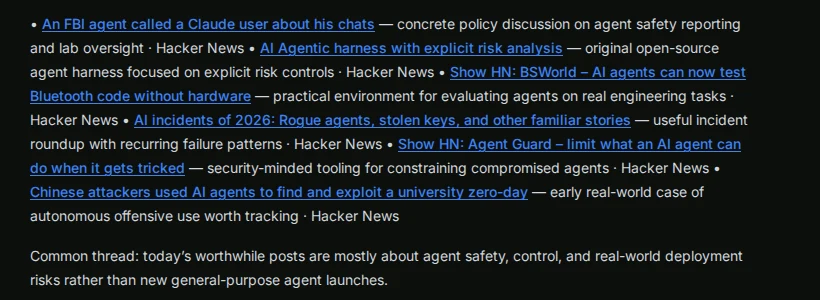 Research and digests
Hacker News digest on Telegram, by an AI agent
On weekdays a code step fetches the day’s posts on your topic, an agent picks the 3 to 7 worth reading, and the digest arrives on Telegram. Links already sent are not sent again.
- Telegram
- Schedule
- Code step
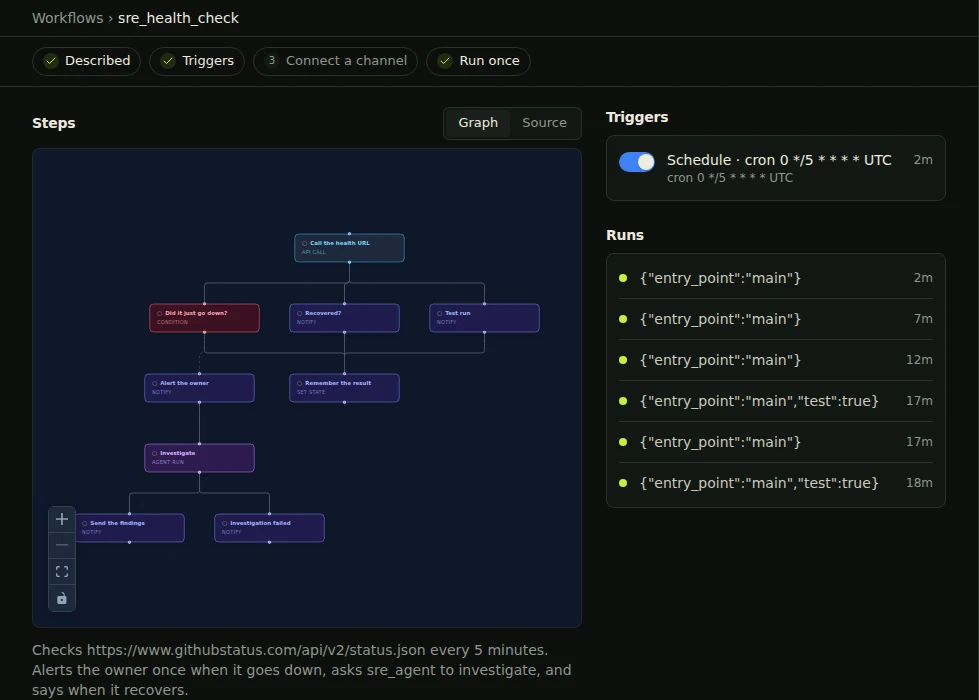 SRE and DevOps
SRE agent that checks /health and investigates
A workflow calls your health URL on a schedule. When it fails you get one alert, the agent looks for the cause, and you hear when the service recovers.
- Telegram
- Schedule
- GitHub
Questions
- Does the agent make up answers when the docs are silent?
- Its instructions say to answer only from the docs, quote steps exactly and link the page, and to say it does not know when the docs do not say. That is when it offers a ticket.
- Can I use Zendesk or another tracker instead of Linear?
- The ticket is filed by tools/create_ticket.ts, a TypeScript module. Replace its two GraphQL calls with your tracker’s API and change the connection in blueprint.toml.
- Can it do things in my product, not just answer?
- Yes. An embedded agent can also be given your product’s own functions as client-side tools, which run in the signed-in user’s session. See Embedded agents.
- Can I embed it with React instead of a script tag?
- Yes. @distri/react’s Chat component takes the same agent; apply prints the script tag, and the docs show the React setup.
Set up your first agent with one sentence.
Distri is open source under the MIT licence: self-host it, or start on Distri Cloud’s free tier. Pricing