An AI SRE agent that checks your API and investigates on Telegram
A workflow calls your health URL on a schedule. When it fails you get one alert, the agent looks for the cause, and you hear when the service recovers.
- Telegram
- Schedule
- GitHub
- blueprint: sre-agent
“Create an SRE agent for https://api.example.com that I can ask from Telegram; check /health every 5 minutes, and if it fails, alert me and start investigating.”
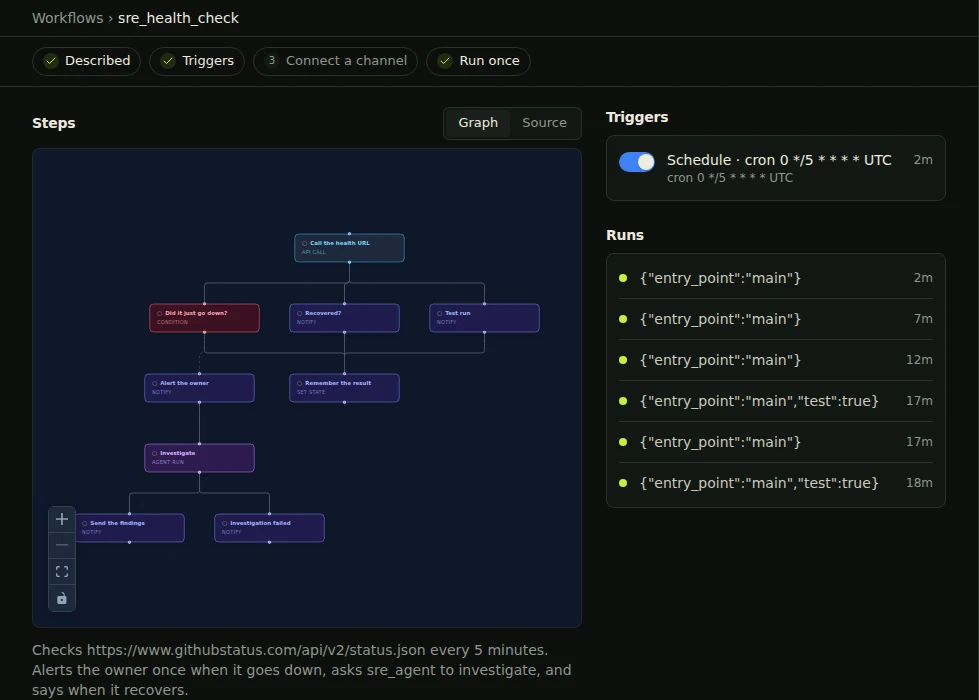
The run, step by step
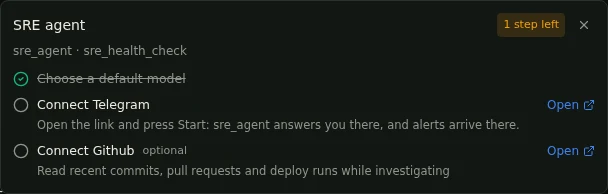
What the sentence sets up
| What | Name | What it does |
|---|---|---|
| Agent | sre_agent | Server agent, read-only. Calls URLs, reads GitHub, follows the sre_runbook skill. Never restarts, rolls back or merges anything. |
| Workflow | sre_health_check | Calls the health URL every every_minutes. Alerts once when it goes down, asks sre_agent to investigate, says when it recovers. |
| Skill | sre_runbook | The five steps the agent follows on a failed check. |
| Chat | Telegram | One link to @distri_bot. Ask the agent anything there; alerts arrive there too. |
| Connection | GitHub | Optional. Recent commits, merged pull requests and workflow runs. |
schedule ─► check (api_call, expect 200) ─┬─ went down? ─► alert ─► investigate (sre_agent) ─► report
                                          ├─ recovered? ─► "✅ recovered"
                                          └─ remember was_ok (state kept between runs)
Apply it with one request
The web chat and distri apply both call POST /v1/blueprints/apply. This request and its response are from a run on Distri’s staging server on 20 Nov 2026; the response is trimmed.
curl -s -X POST "$DISTRI_API/blueprints/apply" \
  -H "Authorization: Bearer $TOKEN" -H "X-Workspace-Id: $WORKSPACE" \
  -H 'Content-Type: application/json' \
  -d '{"sample": "sre-agent", "params": {"health_url": "https://api-dev.distri.dev/health", "service_name": "distri staging API"}}'
{
  "blueprint": "sre-agent",
  "status": "pending",
  "items": [
    { "kind": "skill", "name": "sre_runbook", "action": "saved" },
    { "kind": "agent", "name": "sre_agent", "action": "created" },
    { "kind": "workflow", "name": "sre_health_check", "action": "created" }
  ],
  "pending": [
    { "id": "model:default", "title": "Choose a default model", "required": true, "done": true },
    { "id": "channel:telegram", "title": "Connect Telegram", "required": true, "done": false },
    { "id": "connection:github", "title": "Connect Github", "required": false, "done": false }
  ],
  "message": "Set up. 1 step needs you: Connect Telegram."
}
Test run: the health check step
curl -s -X POST "$DISTRI_API/blueprints/installs/$INSTALL_ID/test" \
  -H "Authorization: Bearer $TOKEN" -H "X-Workspace-Id: $WORKSPACE" -d '{}'

# the first two steps of the response
{ "id": "check", "label": "Call the health URL", "status": "completed",
  "result": { "ok": true, "status": 200, "latency_ms": 119,
              "body": { "status": "ok", "version": "0.4.0" } } }
{ "id": "went_down", "label": "Did it just go down?", "status": "completed",
  "result": { "value": false } }
The same with the CLI
distri apply samples/sre-agent --set health_url=https://api.example.com/health --wait --test
Parameters
| Param | Default | Meaning |
|---|---|---|
health_url | required | Must return 200 when the service is healthy. |
service_name | the service | Used in the alert messages. |
every_minutes | 5 | How often the check runs. |
repo | none | owner/name, read through the GitHub connection while investigating. |
One alert per outage, not one per check
The workflow keeps was_ok in its state between runs. The alert, the investigation and the report run only on the check where the service went down (!steps.check.ok && state.was_ok != false). While it stays down, later checks send nothing. The first check that passes again sends one ✅ message and resets the state.
A test run (--test, or Run test on the set-up card) skips the alert and sends a "connected" message with the status the check returned.
What the investigation does
The investigate step runs sre_agent with the failed status, latency and response body. The agent loads the sre_runbook skill and:
- calls the health URL twice, a few seconds apart, and records status, latency and the first 300 characters of the body;
- classifies the failure: 5xx with a body, a timeout or connection failure, or a 4xx that suggests a moved route;
- with GitHub connected, lists the commits, merged pull requests and workflow runs of the last 6 hours, and names the commit closest before the failure;
- searches for an ongoing incident at the hosting or database provider;
- reports in at most 8 lines: what is broken, since when, the likely cause with evidence, one next step.
If the agent fails, the owner gets "I could not finish the investigation" with the error, so an outage is never silent.
The blueprint
Plain files in samples/sre-agent. Copy the folder, change the prompt or the schedule, and apply it again.
blueprint.toml
name = "sre-agent"
title = "SRE agent"
category = "engineering"
about = "An on-call agent you can ask from Telegram. A health check runs on a schedule; when it fails you get one alert and the agent investigates, and you hear when it recovers."
prompt = "Create an SRE agent for https://api.example.com that I can ask from Telegram; check /health every 5 minutes, and if it fails, alert me and start investigating."

[params.health_url]
ask = "Which URL should the health check call (the full URL, e.g. https://api.acme.com/health)? It should return 200 when the service is healthy."
example = "https://api.example.com/health"

[params.service_name]
ask = "What is the service called?"
default = "the service"
required = false

[params.every_minutes]
ask = "How often should it check, in minutes?"
default = "5"
required = false

[params.repo]
ask = "Which GitHub repository deploys it (owner/name)? Optional: the agent reads recent commits and deploys from it."
default = ""
required = false

[channel]
kind = "telegram"
agent = "sre_agent"
workflows = ["sre_health_check"]

[[connections]]
provider = "github"
scopes = ["repo"]
required = false
why = "Read recent commits, pull requests and deploy runs while investigating"

[test]
workflow = "sre_health_check"
input = { test = true }
expect = "A message on Telegram: the SRE agent is connected and the health check returned a status"
agents/sre_agent.md
---
name = "sre_agent"
description = "On-call SRE for {{params.service_name}}: checks health, reads recent changes and explains incidents. Read-only."
max_iterations = 20
tool_format = "provider"
runtime = "server"

[tools]
builtin = ["final", "write_todos", "notify", "search", "browsr_scrape", "load_skill", "tool_search"]

[[available_skills]]
id = "sre_runbook"
name = "sre_runbook"
---

# ROLE
You are the on-call SRE for **{{params.service_name}}**. Its health URL is `{{params.health_url}}`. The owner asks you questions from Telegram, and a health-check workflow wakes you when the check fails.

# HOW TO WORK
- Load the `sre_runbook` skill at the start of any investigation and follow it.
- Check before you answer: fetch the health URL (and any other URL the owner names) with `browsr_scrape` rather than guessing.
- When a GitHub connection is available (repository `{{params.repo}}`), look at the last commits, merged pull requests and workflow runs from the last few hours; a deploy just before the failure is the first suspect.
- You are read-only. Never restart, roll back, merge or change anything; say what you would do and why, and let the owner decide.

# WHEN A HEALTH CHECK FAILED
1. Confirm it: call the health URL again. Note status, latency and the body.
2. Look for a cause: recent deploys or merges, an upstream outage (search for the provider's status page), certificate or DNS problems.
3. Report in at most 8 lines: what is broken, since when, the most likely cause with evidence, and the next step you recommend. If it recovered while you looked, say so.

# STYLE
Short, factual, no filler. Times in UTC. Quote status codes and error text exactly.
workflows/sre_health_check.json
{
  "agent_type": "workflow_agent",
  "name": "sre_health_check",
  "description": "Checks {{params.health_url}} every {{params.every_minutes}} minutes. Alerts the owner once when it goes down, asks sre_agent to investigate, and says when it recovers.",
  "version": "0.1.0",
  "definition": {
    "id": "sre_health_check",
    "steps": [
      {
        "id": "check",
        "label": "Call the health URL",
        "kind": {
          "type": "api_call",
          "method": "GET",
          "url": "{{params.health_url}}",
          "expect_status": [
            200
          ],
          "timeout_secs": 10
        }
      },
      {
        "id": "went_down",
        "label": "Did it just go down?",
        "depends_on": [
          "check"
        ],
        "kind": {
          "type": "condition",
          "expression": "!{steps.check.ok} && {state.was_ok} != false && !{input.test}",
          "then": [
            "alert",
            "investigate",
            "report",
            "report_failed"
          ]
        }
      },
      {
        "id": "alert",
        "label": "Alert the owner",
        "kind": {
          "type": "notify",
          "to": "owner",
          "text": "🔴 {{params.service_name}} is down: {{params.health_url}} returned {steps.check.status} after {steps.check.latency_ms} ms. Investigating…"
        }
      },
      {
        "id": "investigate",
        "label": "Investigate",
        "depends_on": [
          "alert"
        ],
        "on_failure": "continue",
        "kind": {
          "type": "agent_run",
          "agent_id": "sre_agent",
          "prompt": "The health check for {{params.health_url}} failed: HTTP status {steps.check.status} (0 means the connection failed) after {steps.check.latency_ms} ms. Response: {steps.check.body}. Investigate and report."
        }
      },
      {
        "id": "report",
        "label": "Send the findings",
        "depends_on": [
          "investigate"
        ],
        "kind": {
          "type": "notify",
          "to": "owner",
          "text": "🔎 {steps.investigate.output}"
        },
        "when": "{steps.investigate.ok} != false"
      },
      {
        "id": "report_failed",
        "label": "Investigation failed",
        "depends_on": [
          "investigate"
        ],
        "when": "{steps.investigate.ok} == false",
        "kind": {
          "type": "notify",
          "to": "owner",
          "text": "⚠️ I could not finish the investigation: {steps.investigate.error}"
        }
      },
      {
        "id": "recovered",
        "label": "Recovered?",
        "depends_on": [
          "check"
        ],
        "when": "{steps.check.ok} && {state.was_ok} == false",
        "kind": {
          "type": "notify",
          "to": "owner",
          "text": "✅ {{params.service_name}} recovered: {{params.health_url}} returned {steps.check.status} in {steps.check.latency_ms} ms."
        }
      },
      {
        "id": "test_message",
        "label": "Test run",
        "depends_on": [
          "check"
        ],
        "when": "{input.test}",
        "kind": {
          "type": "notify",
          "to": "owner",
          "text": "👋 Your SRE agent for {{params.service_name}} is connected. The health check just returned {steps.check.status} in {steps.check.latency_ms} ms; I check every {{params.every_minutes}} minutes and will message you here if it fails. Ask me anything about the service."
        }
      },
      {
        "id": "remember",
        "label": "Remember the result",
        "depends_on": [
          "went_down",
          "recovered",
          "test_message"
        ],
        "when": "!{input.test}",
        "kind": {
          "type": "set_state",
          "values": {
            "was_ok": "{steps.check.ok}",
            "last_status": "{steps.check.status}"
          }
        }
      }
    ],
    "entry_points": [
      {
        "id": "main",
        "label": "Health check",
        "starts_at": "check",
        "triggers": [
          {
            "type": "schedule",
            "cron": "0 */{{params.every_minutes}} * * * *",
            "enabled": true,
            "input": {}
          }
        ]
      }
    ]
  }
}
skills/sre_runbook.md
---
name: sre_runbook
description: "How the SRE agent investigates a failed health check"
---

# Failed health check: runbook

1. **Reproduce.** Call the health URL twice, a few seconds apart. Record the HTTP status, latency and the first 300 characters of the body. A `0` status means the connection failed (DNS, TLS, refused, timeout).
2. **Classify.**
   - 5xx with a body: the service is up but failing; look at recent changes.
   - Timeout or `0`: network, DNS, TLS or the host is down; check DNS resolution and the certificate expiry.
   - 4xx (401/403/404): the health route moved or now needs auth; probably a deploy.
3. **Recent changes.** With GitHub: commits and merged PRs in the last 6 hours, and the latest workflow runs. Name the commit and author closest before the first failure.
4. **Upstream.** Search for an ongoing incident at the hosting or database provider.
5. **Report** what is broken, since when, the likely cause with evidence, and one recommended next step. Never take an action yourself.
Put it in your product
Every agent Distri runs can also be embedded in your own app with @distri/react or a script tag, and call your product’s functions in the signed-in user’s session. The AI gateway records each model call against the end user, so you see the cost per customer and can cap it.
More agents
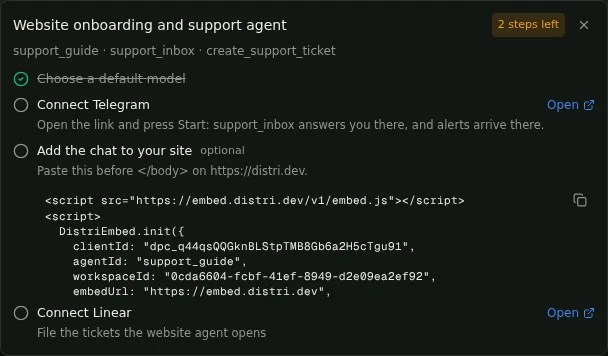 Customer support
AI customer service agent for your website
A chat on your site, set up to answer from your docs pages and, when they don’t cover a question, to take an email and file a Linear issue through a server-side workflow.
- Website embed
- Linear
- Telegram
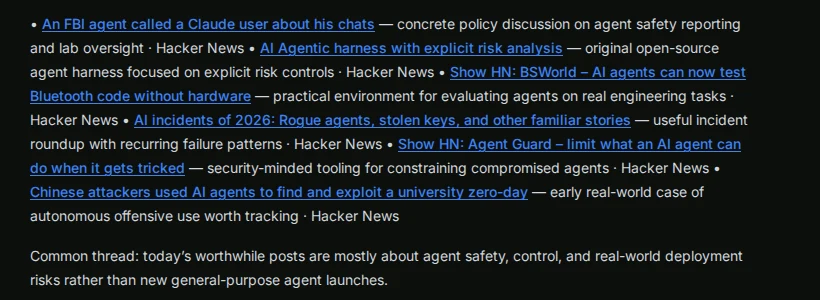 Research and digests
Hacker News digest on Telegram, by an AI agent
On weekdays a code step fetches the day’s posts on your topic, an agent picks the 3 to 7 worth reading, and the digest arrives on Telegram. Links already sent are not sent again.
- Telegram
- Schedule
- Code step
Questions
- Can the SRE agent change anything in production?
- No. The agent is read-only: its tools fetch URLs, search and read GitHub. Its instructions say to recommend a next step and leave the decision to you.
- Which model does it use?
- The workspace default model, unless you set one on the agent. Distri works with 13 providers, and you can bring your own keys.
- Can I run it on my own servers?
- Yes. Distri is open source under the MIT licence. distri apply works the same against a self-hosted server.
- Can it watch more than one service?
- Apply the blueprint once per service with a different health_url and service_name. Each gets its own workflow and schedule.
Set up your first agent with one sentence.
Distri is open source under the MIT licence: self-host it, or start on Distri Cloud’s free tier. Pricing